How to Record and Analyze Rally Length in Tennis|Review Match Patterns from 1-, 2-, and 3-Ball Points
When you review a tennis match, the final score alone does not show what kinds of points were most common.
That is where rally length—how many balls each point lasted—becomes useful.
Recording rally length lets you see whether short points or long exchanges dominated, how often points ended by the third ball, and other match traits that scores alone hide.
With DataTennis, a tennis score recording app, you can log rally length for every point and review rally stats after the match.
What Does Recording Rally Length Tell You?
Two matches can both finish 6–4 and still feel completely different.
One may be full of short points—service aces and return errors. Another may feature long rally after long rally.
With rally length recorded, you can check the average balls per point, whether short or long rallies were more common, and at which rally lengths you won points.
Instead of relying only on a feeling like “rallies felt long today,” you can review the match with real data.
1-, 2-, and 3-Ball Points Each Mean Something Different
In DataTennis, short rallies are not bundled together. You can record and analyze 1-, 2-, and 3-ball points separately.
Points that end on 1 ball
The point ends on the serve alone.
A classic example is a service ace.
Logging these as 1 ball shows how often points were decided on the serve.
Points that end on 2 balls
The point ends on the return after the serve.
Return aces and return errors fall into this group.
You can see whether many points are decided in those two shots from serve to return.
Points that end on 3 balls
After serve and return, the point ends on the server’s next shot.
In tennis, that server’s “third ball” often shapes how the point develops.
That is why DataTennis keeps 3-ball points separate instead of folding 1–3 balls into one bucket.
Points that last 4 balls or more
The point does not end by the third ball and the rally continues.
DataTennis also shows a “4+ ball rate”: the percentage of points in the match that lasted four balls or more.
That number helps you see whether the match was mostly short patterns through the third ball, or whether rallies often stretched further.
How to Record Rally Length in DataTennis
In DataTennis, enable rally length recording before the match starts. Then you can enter rally length for each point while scoring.
A rally length field appears on the score input screen. Set the ball count when the point ends.
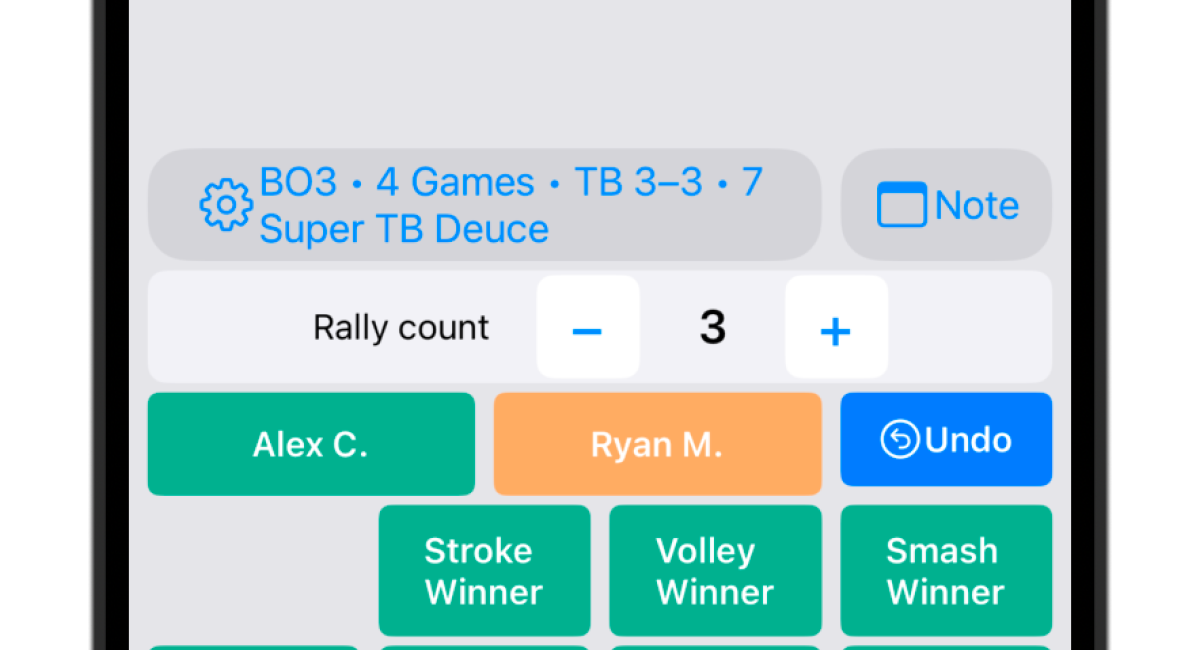
DataTennis rally length recording screen. Record each point’s rally length while entering the score.
For example, log a service ace as 1 ball, a point that ends on the return as 2 balls, and a point that ends on the server’s next shot as 3 balls.
For longer rallies, use the + / − buttons to set the actual length.
Note: rally length recording must be turned on before the match. You cannot switch it on or off mid-match.
Check Average Rally Length, 4+ Ball Rate, and Longest Rally
For matches with rally length recorded, open Rally on the stats screen to review the analysis.
You will first see average rally length, 4+ ball rate, and longest rally.
Average rally length shows how many balls a point lasted on average.
4+ ball rate shows how often points continued past the third ball.
Longest rally shows the longest point of the match in balls.
For example, an average of 2.8 balls and a 20% 4+ ball rate suggests mostly shorter points.
An average of 5.6 balls and a 65% 4+ ball rate suggests many rallies that stretched to the fourth ball and beyond.
Neither pattern is inherently good or bad. Match character changes with playing style and opponent, so use the numbers as material for reviewing your play and theirs.
Analyze Point-Win Rate by Rally Length
DataTennis also breaks rally length into these ranges:
- 1 ball
- 2 balls
- 3 balls
- 4–6 balls
- 7–9 balls
- 10+ balls
For each range, you can see how many points ended at that length and each player or team’s point-win rate.
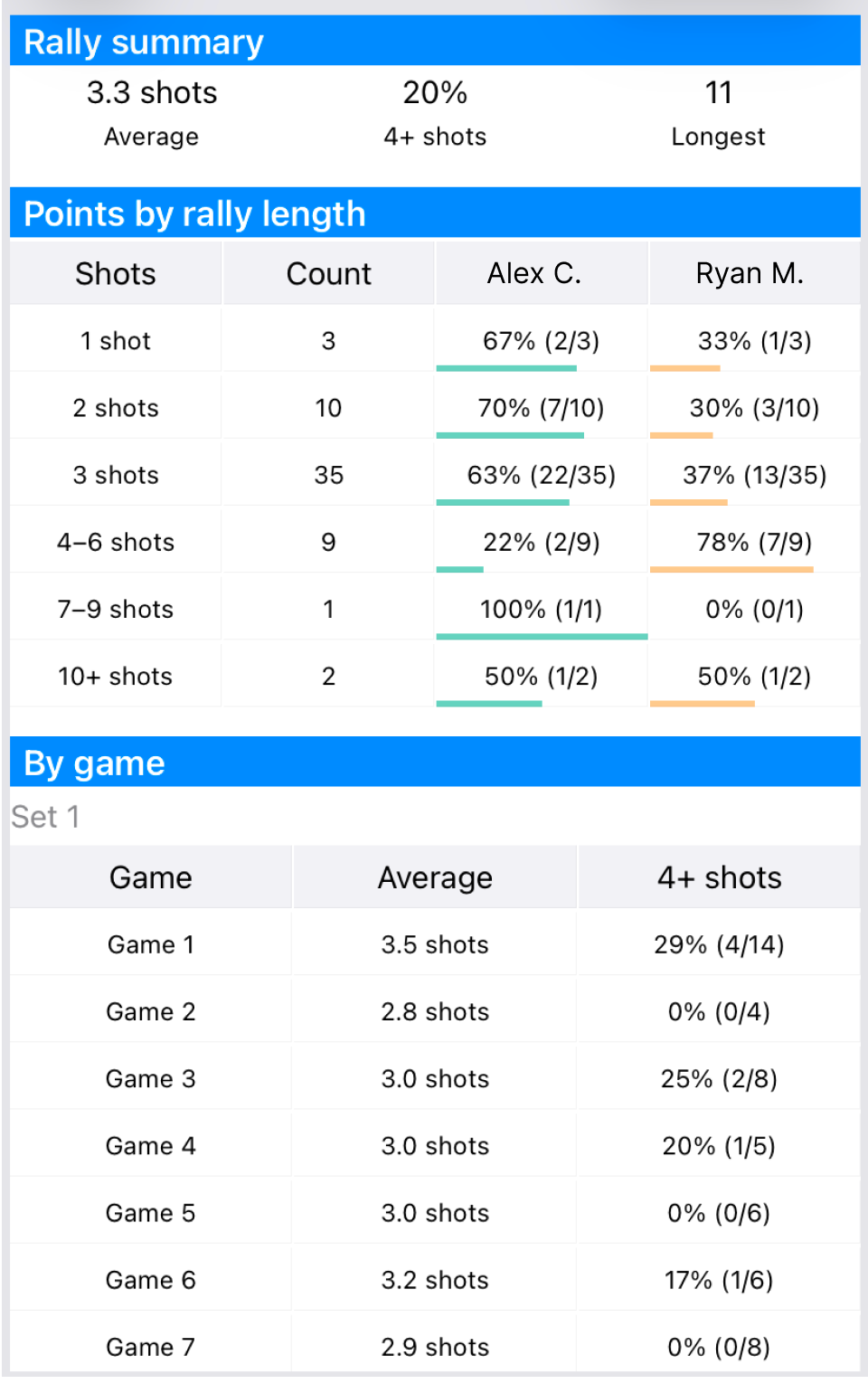
DataTennis rally stats screen. Review point counts and win rates by rally length, plus average rally length by game.
For example, if you see:
- 3 balls: 7 points
- You: 57% (4/7)
- Opponent: 43% (3/7)
that means seven points ended on 3 balls, of which you won four and your opponent won three.
What matters is looking at both win rate and how many points occurred at that length.
A “100%” rate might be just 1 of 1.
100% (1/1) and 75% (9/12) mean very different things.
Checking point count and win rate together makes it easier to spot which rally lengths truly shaped the match.
See Rally Differences by Game
You can also review rally trends game by game, not only match averages.
DataTennis shows average rally length and 4+ ball rate for each game.
If game 1 averages 2.8 balls with a 20% 4+ ball rate, and game 2 averages 5.6 balls with 65%, you can see that longer points increased in game 2.
Comparing games helps you notice whether point length shifted during the match.
Useful for Coaches and Parents Too
Rally length is useful not only for your own matches, but also when analyzing a player’s or a child’s match.
You can confirm patterns in numbers—for example, many points ending by 3 balls, a drop in win rate on 4+ ball points, or the opponent winning more on long rallies.
Watching live, memorable long rallies or mistakes can skew your impression.
Recording rally length lets you review objectively which point lengths were actually most common.
Coaches reviewing players and parents reviewing their children’s matches can use it as well.
Review Match Traits You Cannot See from the Score Alone
In tennis, there is more information than win–loss and game scores: how many balls each point lasted.
Recording rally length reveals average point length, 1-, 2-, and 3-ball endings, the share of 4+ ball points, and point-win rate by rally length.
In DataTennis, enter rally length point by point while scoring, then review rally stats after the match.
Try analyzing match traits that scores alone cannot show—starting from rally length.
Start using DataTennis for free
