Table Tennis Point Analysis: Track How Points Are Won and Lost
When you look back at a table tennis match, the final score alone rarely explains what actually happened.
It does not tell you why you won points, or how you lost them.
Two matches that both finish 11-8 can feel completely different. One may be driven by strong serves. Another may come from forcing opponent mistakes. A third may be decided by unforced errors on receive or drive.
With DataTT, you can record more than the score. You can also track how each point ended.
Reviewing those patterns after the match makes it easier to spot strengths and areas to improve.
If you want a refresher on scoring basics first, see Table Tennis Scoring Rules.
Record How Each Point Ends
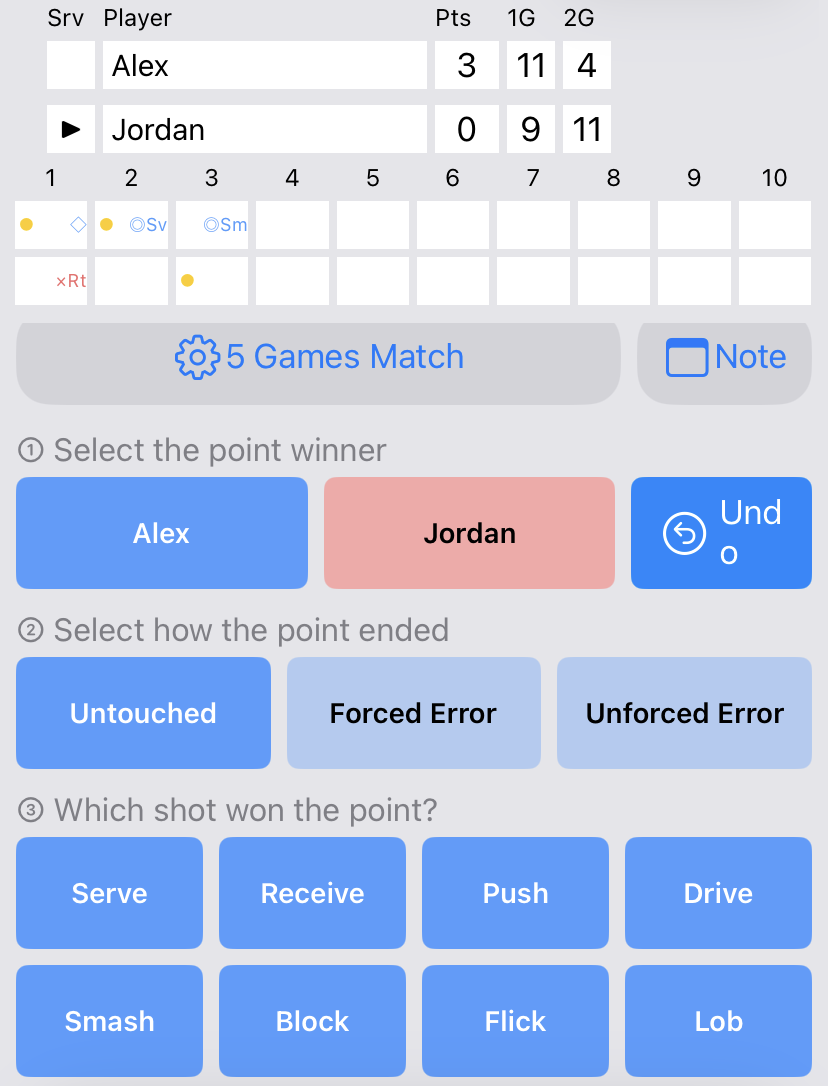
After selecting the point winner, you can record the point outcome and shot type.
In DataTT, after you select who won the point, you can record how the point was decided.
The app uses three outcome types:
- Untouched
- Forced Error
- Unforced Error
Untouched
Use this when the opponent never touched the ball.
Examples include:
- a service ace
- an attack that the opponent cannot reach
- a smash that ends the point cleanly
Forced Error
Use this when your play caused the opponent to miss.
Tough placement, spin, or pace that makes a return fail can be recorded here.
Unforced Error
Use this when you judge that the point ended on an unforced mistake.
DataTT lets you record one of these three outcomes for each point.
Track the Shot Behind Each Point
After selecting the point winner, you can record the point outcome and shot type.
You can also record the shot involved in the point, not only the outcome.
Supported shot types are:
- Serve
- Receive
- Push
- Drive
- Smash
- Block
- Flick
- Lob
That makes it possible to review patterns such as:
- forcing errors with your drive
- making too many unforced errors on receive
Instead of stopping at “I made a lot of mistakes,” you can keep a clearer record of which shot led to each win or loss, and how the point ended.
Review the Match Point by Point
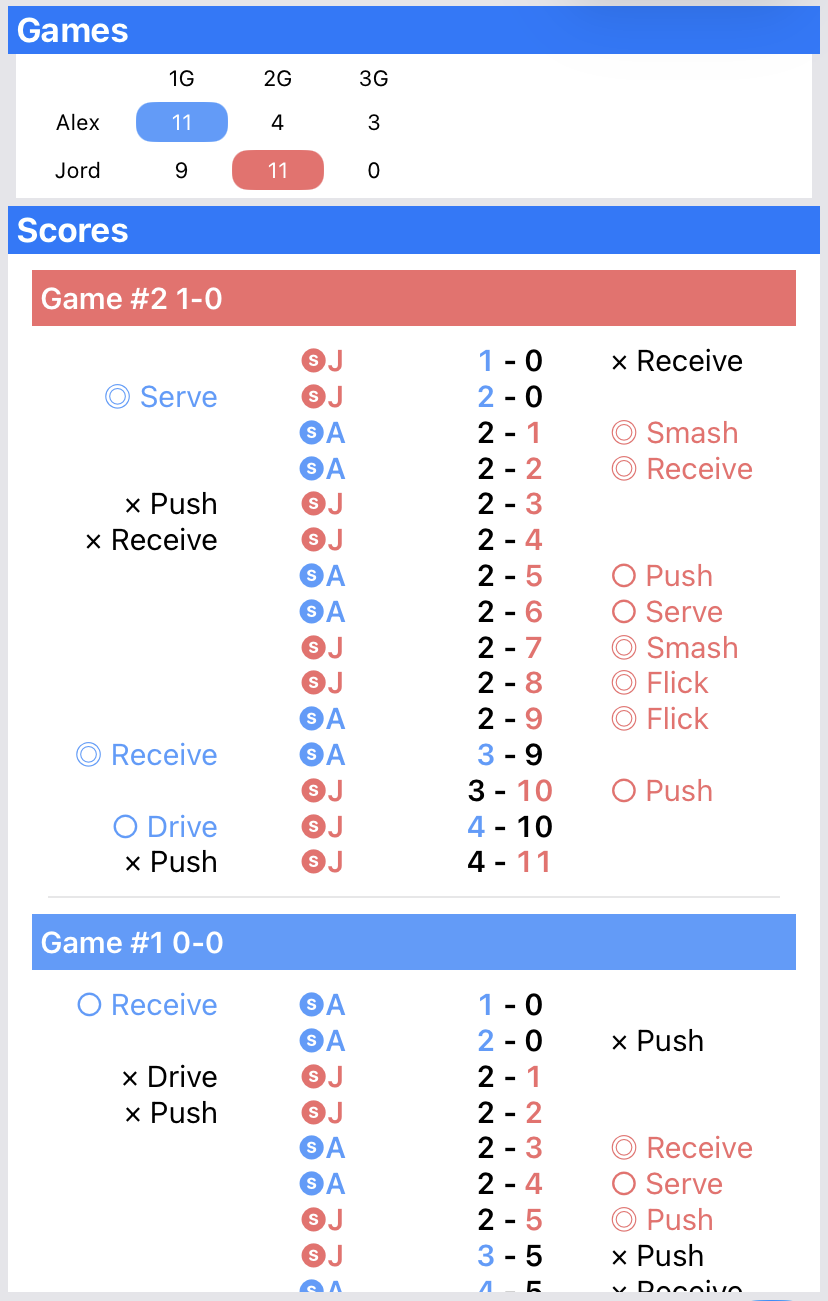
You can review how each point ended and which shot was involved, together with the flow of the score.
After the match, you can review the recorded points in history.
Along with the score progression, you can check details such as:
- who was serving
- who won the point
- the point outcome
- the shot type
For example, you may notice that receive errors piled up late in a game, or that early points often came from forcing push mistakes.
Those trends can be easy to miss while the match is still going.
Analyze Point Outcomes by Shot
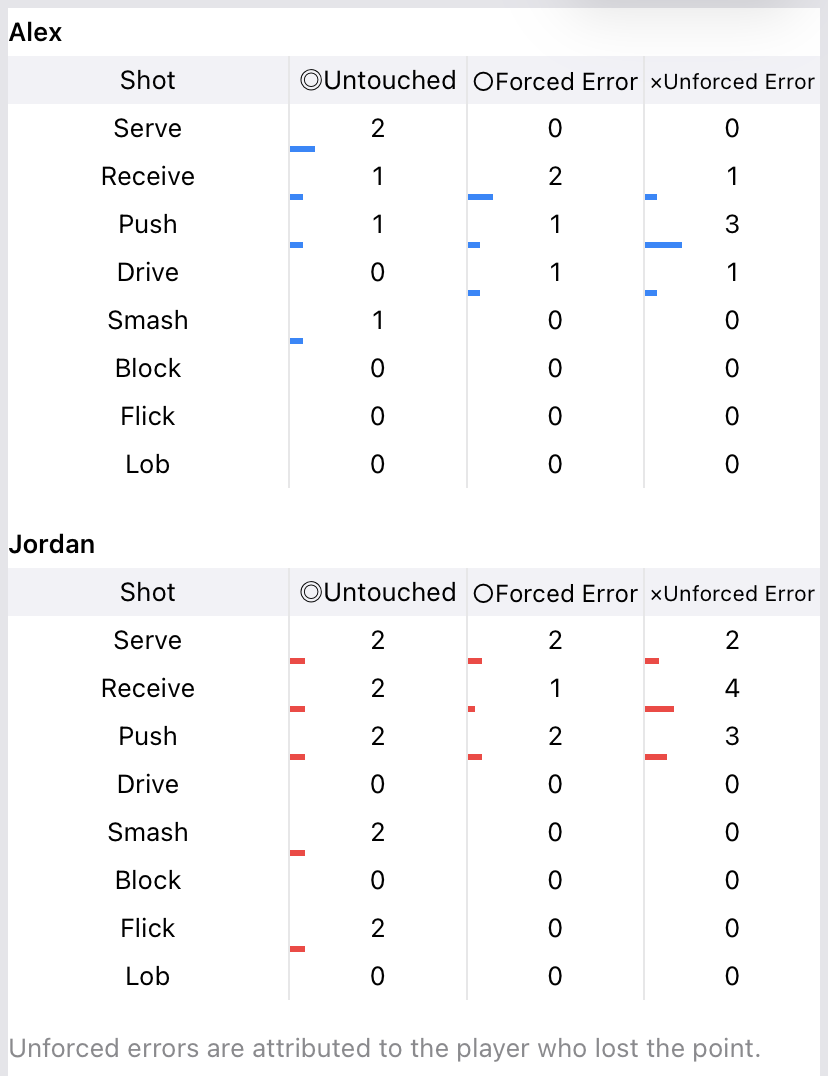
You can review point outcomes aggregated by shot type.
Recorded data can also be summarized by shot type.
You can review patterns such as:
- how many Untouched points came from Serve
- how many Forced Errors came from Drive
- how many Unforced Errors came from Receive
This helps you separate shots that tend to win points from shots that tend to lose them.
How to Use the Data
Treat the numbers as material for review, not as a fixed verdict.
Many Forced Errors from Drive
Your drive may be creating pressure that leads to opponent mistakes.
Even when you do not finish the point yourself, forcing errors can still be a useful strength to notice.
Many Unforced Errors on Receive
If you lose many points on receive, it can be useful to review:
- spin reading
- receive choices
- placement
- consistency
Many Untouched Points from Serve
If serve produces a high number of Untouched points, that match may show that your serve was working well.
Avoid over-interpreting a single number. Use it as a clue for practice and the next match.
Direct Winners Are Not the Only Useful Measure
In table tennis, not every valuable point is a clean winner.
Breaking the opponent down and drawing a difficult return also matters.
Because DataTT separates Untouched and Forced Error, you can review:
- points you finished directly
- points you earned by forcing a miss
That gives a fuller picture than winners alone.
Detailed Recording Is Optional
DataTT can record point outcomes and shot types when you want deeper analysis.
You can also keep score with simple one-tap input when you do not need that detail.
Choose the level of detail that fits the match:
- quick score-only recording
- detailed recording with outcomes and shots
You do not need to fill in every field for every match.
Go Beyond the Final Score
After a match, memory often holds only the dramatic points.
Recording details such as:
- which shots won points
- which mistakes appeared most often
- which plays forced opponent errors
can reveal patterns that feel different from your impression.
Keeping point outcomes helps you review not only whether you won or lost, but what kind of match it was.
Analyze Your Matches with DataTT
DataTT lets you record the score, point outcome, and shot type for each point. After the match, review your point history and shot-by-shot statistics to better understand how points were won and lost.
[See all DataTT features](/table-tennis/en/)