Track Table Tennis Scores on Apple Watch with DataTT
Keeping a record of your table tennis match is useful, but taking out your iPhone after every point can interrupt the flow of play.
With the DataTT table tennis score tracker, you can record the score from your Apple Watch during the match.
Enter each point from your wrist, then send the match to your iPhone when it is over. DataTT saves it on your iPhone so you can review the result, point history, and match stats.
Track Scores from Your Apple Watch
During the match, tap “Me” or “Opp.” on your Apple Watch to record each point.
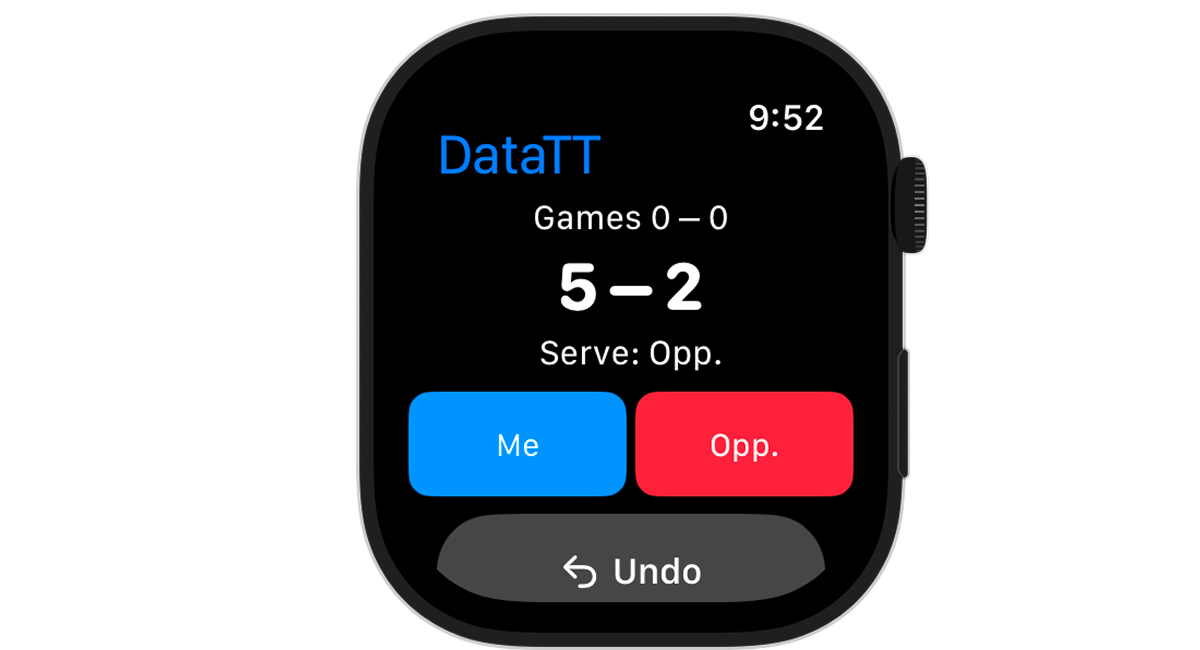
The score screen shows the current Games score, point score, and Serve player. You can follow the match state and record the next point from the same screen.
For a refresher on 11-point games, deuce, and service changes, see our Table Tennis Scoring Rules.
Record Points Without Taking Out Your iPhone
The main benefit of Apple Watch scoring is that you do not have to reach for an iPhone in your pocket or bag after every point.
When a point ends, record it with a quick tap on your wrist. You do not need to keep handling your iPhone beside the table, making it easier to track the score while playing your own match.
Simple Score Tracking During the Match
By default, DataTT uses simple score entry: choose the side that won the point and continue playing.
The app handles 11-point games with a two-point margin at deuce, best-of-3, best-of-5, and best-of-7 matches, game progression, and service rotation. If you enter the wrong point, Undo returns to the previous point. Singles and doubles scoring are both supported, including the service order for doubles.
This keeps the main action quick when you only want to save the score.
Add Point Analysis When You Need It
Turn on “Point Analysis” in Match Settings when you want to record more detail. Each point then follows three steps:
- Point winner
- Point outcome
- Shot
The available outcomes are Untouched, Forced Error, and Unforced Error. Shot choices are Serve, Receive, Push, Drive, Smash, Block, Flick, and Lob.
Point Analysis is optional. Leave it off for quick score-only entry, or turn it on when you want point outcomes and shots in your post-match review. Learn more in our guide to recording and analyzing point outcomes.
Send Your Match to iPhone
After the match, send the recorded match from your Apple Watch to DataTT on your iPhone.
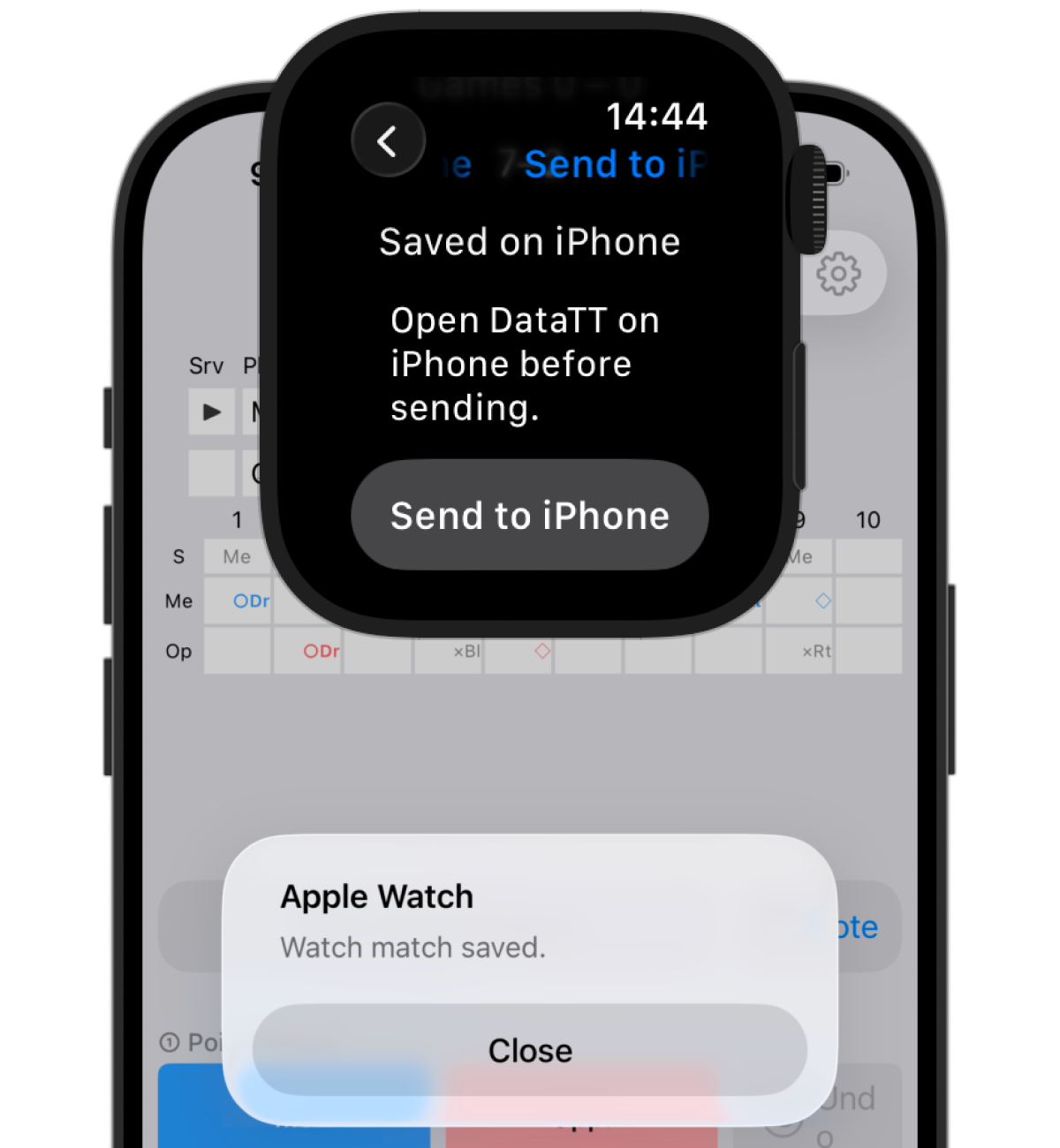
To send a match:
- Open DataTT on your iPhone and make sure it is reachable from your Watch
- Tap “Send to iPhone” on your Apple Watch
- Confirm that the match has been saved in DataTT on your iPhone
The first transfer of a Watch match is saved as a new match on your iPhone. DataTT must be open and reachable on the iPhone when you send it.
Free Plan Save Limit
The free plan can save up to five matches on the iPhone. If five matches are already saved, DataTT cannot add a new match from your Watch. Delete a match you no longer need on the iPhone, then send the Watch match again.
Premium removes the saved-match limit. Updating the same Watch match that was already imported is still allowed when the free plan has five saved matches.
Review the Match on iPhone
After the transfer, open the match in DataTT on your iPhone to review:
- the match result and game score
- point-by-point score history
- core stats such as Serve Points Won, Return Points Won, Total Points Won, Max Win Streak, and Max Lose Streak
If you recorded the match with Point Analysis on, the outcomes and shots you selected on the Watch also appear in point history and shot analysis. A score-only Watch match does not gain outcome or shot data automatically.
Apple Watch does not record rally length, so sending a Watch match does not create rally analysis. To track the number of shots in each point, use the iPhone workflow described in our table tennis rally analysis guide.
Record on Apple Watch during the match. Review on iPhone afterwards. Each device handles the part of the workflow that suits its screen.
Who Is It For?
- Players who want to save the score without taking out a phone
- Players recording their own match from their wrist
- Anyone who wants to review match history and stats on an iPhone afterwards
Apple Watch for Recording, iPhone for Analysis
Apple Watch is designed for quick point entry during play. Use simple scoring, or add Point Analysis when the extra detail matters.
The iPhone is where you review the transferred result, point history, and stats on a larger screen. Instead of treating the Watch app as a smaller copy of the iPhone app, DataTT gives each device a clear role: recording during the match and reviewing after it.
Track Your Table Tennis Match on Apple Watch
With DataTT, you can record the score on your Apple Watch during the match, send it to your iPhone afterwards, and review what happened.
[See all DataTT features](/table-tennis/en/)